Your P60 was basically a document that summarised your tax, PRSI and USC deducted by your employer in the relevant tax year. Workers usually receive a P60 by 15 February each year from the employer if they were employed on the last day of that year i.e. 31 December.
If you left employment during the tax year, then you would have got a P45 instead.
Employers deducted tax based on the Tax Credit Certificate issued to them by Revenue.
A P60 wasn't a Revenue assessment of your position or an indication of your final tax liability for the year.
Sample of what a P60 looked like
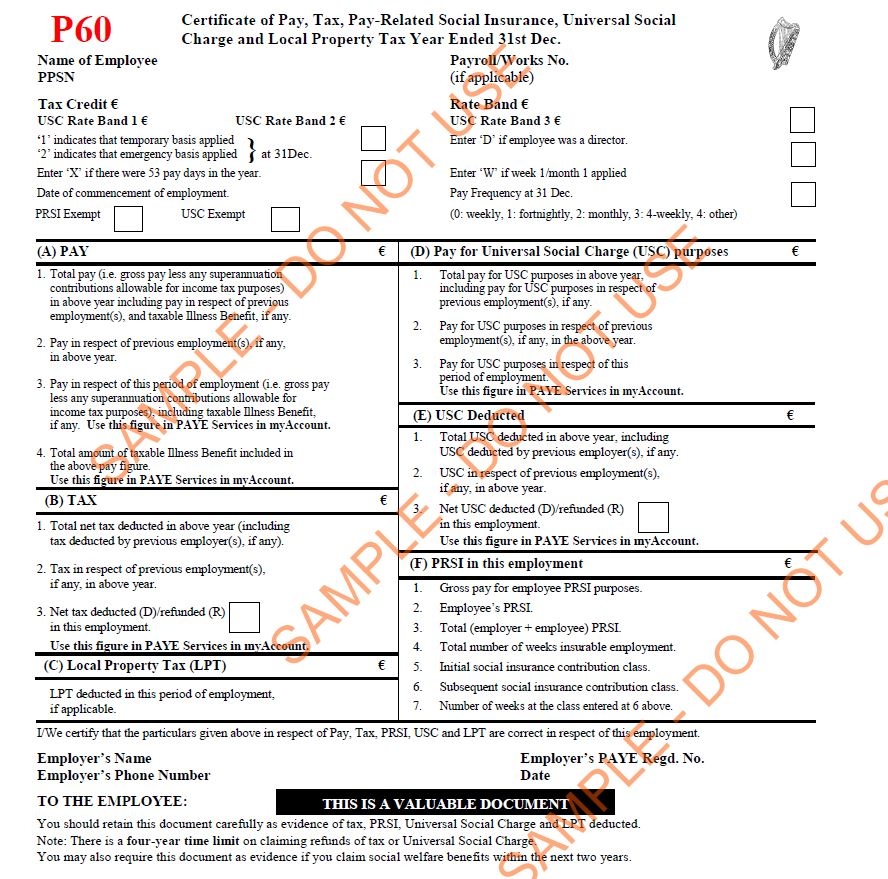
Top portion – Personal details
Here you’ll find the year the file relates to as well as a number of your personal details including:
-
Name
-
Address
-
PPS number
-
Tax credit
-
Rate band information
Note: The tax credit and band are merely a summary of what’s been applied by payroll.
Section A – Taxable pay
Details of your gross taxable pay for the year. It’s important to remember the figure here will be after pension deductions or similar contributions made through payroll. Also, if you changed jobs during the year, your pay details in this section will be split into the salary paid by your previous employers and what you’ve been paid by your current employer.
Section B – Tax deduction
Details your total tax deduction in the year. Again, the tax paid details will be subdivided by the employer if you changed jobs during the year.
Section C – Local Property Tax (LPT)
Here you will find details of LPT deductions.
Section D – Pay for Universal Social Charge (USC)
In this section, your total pay for USC purposes is outlined.
Section E – USC Deducted
Here you'll see how much of your pay was subject to USC in the year. This figure may not be the same as the amount of pay subject to tax as it will be prior to the deduction of pension contributions.
Section F – PRSI in this employment
This outlines exactly how much PRSI you paid in the previous tax year.
The bottom section
The last section is where you can see details of your employer’s name, registration number, and address.
You can send your P60 to info@taxback.com to help us determine if you can claim a PAYE tax refund.
As part of PAYE modernisation, P45s and P60s have been abolished and replaced with an online system.
For the year 2019 and in future, you no longer get a P60 at the end of the year. Instead, an Employment Detail Summary will be available to you.
An Employment Detail Summary contains details of your pay as well as the income tax, PRSI and Universal Social Charge (USC) that has been deducted by your employer and paid Revenue. It also records your Local Property Tax (LPT) deductions (if you choose to have the LPT deducted from your pay).
It is based on the information given to Revenue by your employer. You may have other tax liabilities that are not listed.
Comments (0 comments)